


Boom Loop Video Maker Infinity
4.4137.00 Reviews
App Specs
- Version
- b.0.2.219
- Updated On
- License
- Free
- Downloads
- 1,000,000+
- Developer
- Sarafan Mobile Limited
- Categories
- Video Players & Editors
- Platform
- Android
Screenshots
 Analysis by AppCompare
I find the clearest way to judge a looping-video editor is to ask what it helps me make quickly, and what it makes harder than it needs to be. Boom Loop Video Maker Infinity is built around short, repeatable clips rather than full video projects, so it makes most sense when I want a small visual moment to hold attention without opening a much larger editing suite. That focus is useful, but it also means the app is not a substitute for a general-purpose editor.
Who benefits most from a focused loop editor
I’d recommend this kind of tool to someone who already has a clip in mind and wants to turn it into a loop, reverse it, or adjust its pace without learning a complicated timeline. A creator making a quick post, a small business owner preparing a repeating product shot, or a friend turning a funny moment into a shareable clip can all get value from that narrower workflow. If the goal is a polished short film with layered titles, detailed color work, and precise audio mixing, I’d choose a fuller video editor instead.
A practical tip is to pick source footage with a clear action that can naturally repeat: a pour, a wave, a turning object, or a brief expression. The editor can help shape the repetition, but it cannot make an awkward beginning and ending feel seamless by itself. I’d trim around the action first, then try the loop treatment, and only add speed or reverse effects once the basic movement feels right. That order reduces the chance of polishing a section that does not loop well.
A realistic quick-edit workflow
Imagine I’ve filmed a mug being filled while making coffee and want a short clip for a social post. I’d choose the moment where the stream and cup movement are most visually clear, trim away the setup, and preview how the action looks when it repeats. If the ending feels abrupt, reversing the clip may create a more satisfying back-and-forth motion; if it feels sluggish, a speed adjustment could help. I’d add music only after the visual rhythm works, since a catchy track cannot fix a loop that already feels uneven.
That workflow also shows why this app is more useful for small, deliberate edits than for rescuing poor footage. A shaky recording, a cluttered background, or a subject that leaves the frame may still look distracting after looping. I’d take a second clip with steadier framing when possible rather than expecting the editor to repair every filming problem. Good source material is the biggest shortcut.
How it fits beside other editing options
Compared with a full mobile video editor, a loop-focused app can feel less intimidating because its purpose is easier to understand: select a clip, shape the repeat, and prepare it to share. The trade-off is that a dedicated editor is usually the better choice when a project needs several scenes, captions, detailed transitions, or a carefully arranged soundtrack. For a simple repeating visual, using a large editor can add steps without improving the result; for a multi-part story, this app’s focused approach may feel restrictive.
It also occupies a different spot from a basic GIF converter. Turning video into a GIF is handy when I need an image-style animation, while a video loop can be preferable when I want to keep a more familiar video format or pair the result with music. The right choice depends on where I plan to post or send it. I’d check the destination’s format and playback expectations before spending time editing, especially if the clip is meant for a particular social platform or messaging conversation.
Worth Reading Before You Choose

EA SPORTS FC Mobile 26 Is a Bigger Football Game, but It Takes Time

Flipboard Shows What News Apps Must Do Beyond the Feed

Switching to Android Auto Means Rethinking Your Driving Routine

Google Calendar Makes a Crowded Week Easier to Manage

Ludo King Makes the Most of the Minutes Between Plans

Baby Panda World Brings Quick Play to Modern Phones, but Its Game Library Feels Busy
What’s the Buzz About?
So, what exactly is Boom Loop Video Maker Infinity? In simple terms, it’s an app that lets you create seamless loop videos with ease. It’s like having a little piece of magic right in your pocket. Whether you’re a content creator looking to spice up your feed or just someone who enjoys dabbling in creative video edits, this app has something for you.
Getting Started: The Interface
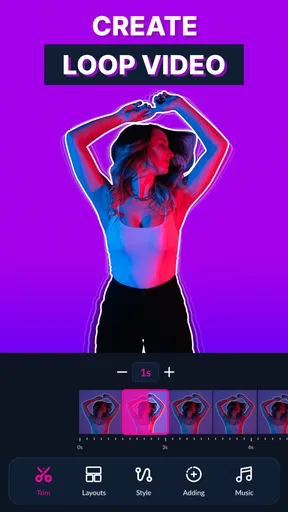
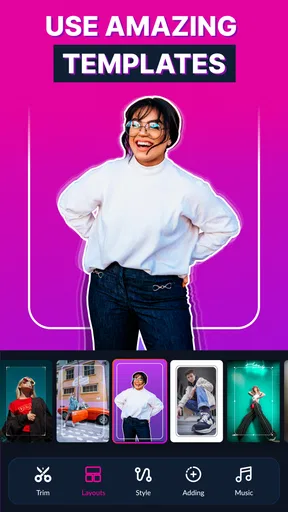
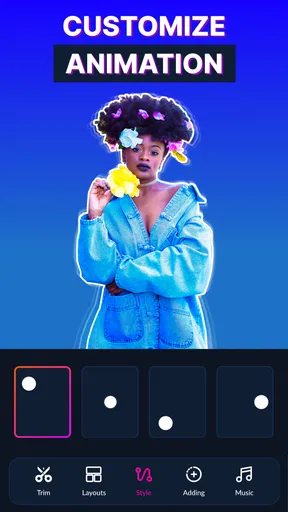
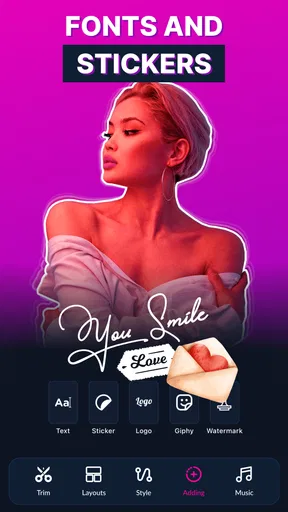
The first thing I noticed when I opened the app was its user-friendly interface. You know how some apps can feel like they’re written in a different language? Well, not this one. Navigating through the app is a breeze. Everything is laid out intuitively, from selecting video clips to choosing loop styles.
I also appreciated the quick tutorial that pops up when you first launch the app. It’s like a friendly tour guide making sure you don’t miss any of the good stuff.
Features That Wow
This app is packed with features that let you unleash your creativity. You can trim, reverse, and even speed up your clips to get the perfect loop. One of my favorite features is the “Infinity Loop” option, which allows you to create loops that have no discernible start or end. It’s perfect for creating those hypnotic, endlessly repeating videos that keep viewers hooked.
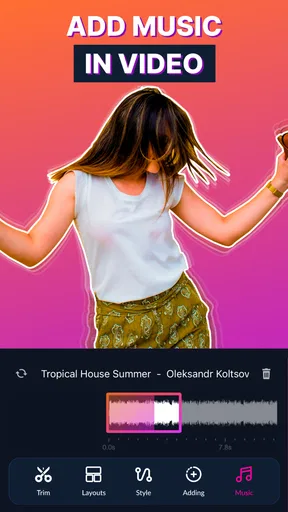
And for those who love music as much as I do, you can add your favorite tracks to your loops. The app offers a decent library of tunes, or you can import your own. Just imagine syncing your loops to your favorite beats!
Performance and Usability
Now, let’s talk performance. The app runs smoothly on both Android and iOS, and I didn’t encounter any annoying lags or crashes. The processing time for rendering loops is pretty quick too, which is a major plus when you’re in the creative zone and don’t want to lose your momentum.
Another aspect I loved is how the app handles video quality. Your loops come out crisp and clear, maintaining the original quality of your clips. No pixelated messes here!
Who’s It For?
Honestly, I feel like Boom Loop Video Maker Infinity is for everyone. Whether you’re a social media influencer, a videographer, or just someone who loves playing around with videos, this app offers something valuable. It’s also great for those who might be new to video editing, thanks to its straightforward design and helpful features.
And let’s not forget about the sharing options. Once you’ve crafted your masterpiece, you can easily share it across all major social media platforms directly from the app. It’s like having your own little video production studio on your phone.
Readable enough to start, but worth taking slowly
The tutorial and uncluttered layout give me a relatively gentle first step into editing, especially compared with editors that expose a timeline, tracks, and many controls at once. That matters for people who find dense interfaces tiring or confusing. I would still take a moment to preview each change: a control can be easy to find without its effect being obvious until the clip plays back.
For anyone who prefers larger text or more time to read controls, the practical approach is to work in a calm setting and make one adjustment at a time. I would not assume that a simple interface automatically covers every visual or cognitive need. Its approachable design lowers the learning curve, but individual comfort will depend on the device, display settings, and how the editing controls appear on that screen.
Different hands, ears, and viewing situations
Loop editing can be forgiving for people who do not want to make many precise timeline cuts: a short source clip and a small set of transformations keep the task focused. Still, trimming and choosing a loop may involve fine control, so anyone with limited dexterity should try a short, low-stakes clip first and see whether the selection steps feel manageable. I’d avoid beginning with a once-in-a-lifetime recording, because experimentation is part of finding a comfortable workflow.
Sound is optional to the visual idea, even though the app supports adding music. That gives me a useful choice when I’m editing somewhere quiet, avoiding audio, or making a clip whose movement should carry the joke or message on its own. If I do use a track, I’d check the result at a comfortable volume and make sure the visual still makes sense with the sound off; many people watch short clips silently in shared spaces.
Where and when it makes sense
This is most convenient when I have a phone, a few spare minutes, and a clear clip ready to edit. At home, I can compare several loop attempts without rushing. On a commute or in a waiting room, I might prefer to choose and trim the footage but postpone music and sharing until I can give the preview my attention. A loop is short, but judging whether its ending flows into its beginning takes a little focus.
The app is aimed at video editing and works on Android and iOS; its minimum operating-system requirement is version 10. It is free to start, with in-app purchases ranging from $5.99 to $29.99 per item. I’d treat that as a reason to explore the free experience before paying, not as a reason to assume every useful control requires an upgrade. Sarafan Mobile Limited develops it, and the current version is b.0.2.219.
Small creative choices that improve the result
One less obvious trade-off with looping is that repetition makes tiny visual interruptions more noticeable. Before exporting, I’d watch the clip several times in a row rather than judging only the first pass. Look for a brightness jump, a hand that appears to teleport, or a background detail that shifts at the join. If the action does not connect naturally, a reverse-and-forward feel may be more pleasing than forcing a seamless repeat.
Music deserves a separate check. A track that sounds fine over one play may feel tiring when the video repeats, and a strong beat can draw attention to an imperfect visual join. I’d try the loop without music first, then add audio and replay the complete result. For a product demo, a quiet visual loop may communicate more clearly; for a playful personal post, a musical cue can give it personality.
Remaining barriers and sensible alternatives
There are limits to what a focused app can solve. It is not the option I’d pick for detailed caption placement, a sequence of multiple scenes, or careful control over every part of a soundtrack. If those needs are central, a broader editor is the more sensible starting point, even if it takes longer to learn. If I only need a moving image that behaves like a GIF, a dedicated conversion tool may also be more direct.
Storage is another practical consideration, particularly if I keep several source videos and exported versions on the same device. I’d review the clip before importing it and avoid saving multiple near-identical attempts unless I need them. The app’s Everyone age rating makes it broadly suitable from a content-rating perspective, but that does not mean every editing task or purchase decision is right for every person; a parent or caregiver should still guide younger users around spending and sharing.
A balanced recommendation
The app has a 4.4 average from around 28,000 ratings, and it has been installed over a million times. Those figures suggest it has found an audience, but I’d make the decision based on the job I actually need done. It is an appealing choice for quick looping experiments, reverse effects, and short clips that benefit from repetition; it is less convincing when I need a complete production workspace or more exact control than a compact editor is designed to provide.
My advice is to begin with a short, well-lit clip, test the loop before adding music, and watch the finished result more than once. If the controls feel comfortable and the edit is the kind you make often, the app’s focused workflow can save time. If you find yourself wishing for a multi-track timeline or extensive finishing tools, that is a clear sign to move to a fuller editor rather than fight the app’s narrower purpose.
A few things to keep in mind
While the app is fantastic, there are a couple of things to consider. Some of the advanced features are locked behind a paywall, so if you’re looking to dive deep into the app’s capabilities, you might want to consider the premium version. It’s not a dealbreaker for me, but it’s good to know before you get started.
Also, the app does require a bit of storage space, so make sure your device has enough room to accommodate your creative ventures.
In conclusion, Boom Loop Video Maker Infinity is a true gem for anyone looking to create stunning loop videos with ease. It’s user-friendly, packed with features, and performs like a charm. Give it a whirl, and I’m sure you’ll be just as hooked as I am!
Pros
- Intuitive interface for easy navigation.
- High-quality video output options.
- Supports various video formats.
- Quick editing tools for fast results.
- Frequent updates with new features.
Cons
- Limited free version features.
- Occasional in-app ad interruptions.
- Requires internet for full functionality.
- May be resource-heavy on older devices.
- Export options can be limited.
FAQs for Boom Loop Video Maker Infinity
What is Boom Loop Video Maker Infinity?
Boom Loop Video Maker Infinity is a creative app designed for users who want to easily create looped videos with stunning effects. Whether you’re an amateur filmmaker or a social media enthusiast, this app allows you to edit and enhance your videos with a variety of tools and filters.
Is Boom Loop Video Maker Infinity free to use?
Boom Loop Video Maker Infinity offers a free version with basic features. However, for access to advanced tools and premium effects, there is a subscription model. The app provides different pricing tiers for monthly or yearly subscriptions, allowing users to choose based on their needs.
What are the main features of Boom Loop Video Maker Infinity?
The app includes features such as seamless loop creation, a variety of filters, and special effects like reverse play and slow motion. Users can also add music from their library, adjust video speed, and share directly to social media platforms, making it versatile for content creators.
Does Boom Loop Video Maker Infinity support multiple video formats?
Yes, Boom Loop Video Maker Infinity supports multiple video formats, ensuring compatibility with most of your video files. This flexibility allows users to import videos from different devices without worrying about format conversion, making the editing process more efficient.
How user-friendly is Boom Loop Video Maker Infinity?
Boom Loop Video Maker Infinity is designed with an intuitive interface, making it user-friendly for both beginners and experienced editors. The app provides easy navigation and step-by-step guides, helping users to quickly learn how to utilize all the available features effectively.


